MySynchrony
Imagine you're finally ready to make that big purchase—be it a shiny new refrigerator or that dream sofa you've been eyeing—and you discover an app that promises to simplify your financing options. Enter MySynchrony, a financial app designed to manage your Synchrony credit card accounts, track your purchases, and make payments. I decided to give it a whirl and here's what I found.
Getting Started with MySynchrony
First off, downloading and setting up MySynchrony was a breeze. Available on both Android and iOS, the app didn't take much space on my phone, which is a huge plus for those of us who are constantly battling storage issues. Once installed, signing up was straightforward. I just needed my account number on hand and a few personal details to get started.
Interface and Usability
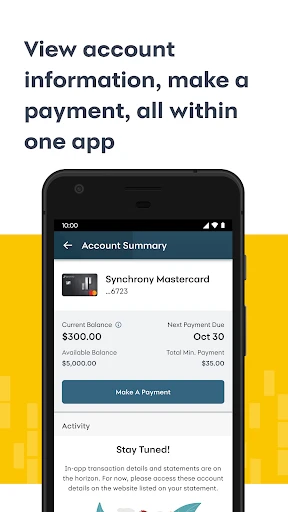
The app's interface is clean and modern, which I appreciate because nobody likes navigating through a cluttered app, right? The dashboard is intuitive, displaying all crucial information at a glance. From your account balance to upcoming payments, everything is a tap away. What really stood out for me was the payment calculator tool—it's so handy for planning out my monthly finances.
Features that Stand Out
One of the standout features of MySynchrony is the ability to link multiple accounts. If you’re like me and have a few store cards, this feature is a lifesaver. No more juggling between different apps or websites to manage each account. Plus, setting up alerts keeps me on top of payment dates, avoiding dreaded late fees.
Another feature I found useful is the transaction history. It's detailed and easy to navigate, allowing me to track every purchase I've made. It's perfect for those of us who like to keep an eye on our spending habits.
The Downsides
Of course, no app is perfect. While MySynchrony performs well in most areas, I did encounter a few hiccups. Occasionally, the app would lag, especially during peak hours. It wasn't a deal-breaker, but it did test my patience a couple of times. Also, while the app is feature-rich, I felt that the customer support section could be more accessible. I had to dig around a bit to find the contact information I needed.
Final Thoughts
All in all, MySynchrony is a solid app for managing your Synchrony credit card accounts. It simplifies the process of keeping track of multiple accounts and offers tools that genuinely help in financial planning. Despite a few minor issues, the pros definitely outweigh the cons. If you’re looking for a convenient way to handle your credit accounts, it’s worth giving MySynchrony a try. Just make sure your phone can handle a slight lag now and then!

- Developer
- Synchrony
- Version
- 4.3.1
- Installs
- 1,000,000+
- Android Version
- 11
- Content Rating
- Everyone
- Price
- Free
- Easy-to-use interface for all users.
- Secure online account management.
- Instant access to account details.
- Efficient customer support service.
- Multiple payment options available.
- Limited app functionality offline.
- Occasional login issues reported.
- Notifications can be overwhelming.
- Limited customization options.
- App updates can be infrequent.