Moon+ Reader
For those who have a voracious appetite for reading on their devices, Moon+ Reader is like a dream come true. As someone who spends a huge chunk of their day flipping through digital pages, discovering this app felt like finding a hidden gem. Let me take you through my experience with it.
Unleashing the Reading Experience
When I first opened Moon+ Reader, I was immediately struck by its intuitive interface. It’s not just about reading; it’s about experiencing each book in the format you prefer. The customization options are mind-boggling! Whether you’re a fan of day mode or night mode, like me who switches depending on the time of day, this app has got you covered.
Features Galore
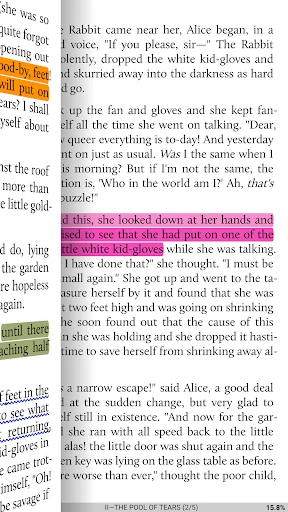
One of the standout features is the ability to adjust everything from font styles and sizes to the background color. This is perfect for someone like me who’s picky about how text looks. And, oh, the text-to-speech feature! I could just sit back, relax, and have my favorite novel read to me while I cooked dinner. It’s like having a personal reader right there with you.
The app supports a wide array of formats, which means you can import books from various sources without a hitch. I downloaded a mix of PDFs and ePubs, and they all opened seamlessly. It’s like having an entire library in your pocket. Plus, the synchronization feature ensures that you can easily switch between devices without losing your place in a book.
A Reader’s Delight
For those who love keeping track of their reading progress, Moon+ Reader offers a neat stats feature. It’s quite motivating to see how many pages you’ve turned or how much time you’ve spent reading. It gives a sense of accomplishment, especially when tackling those lengthy novels.
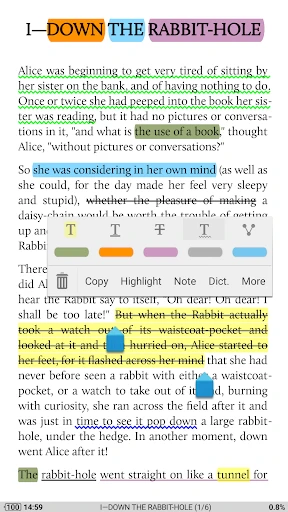
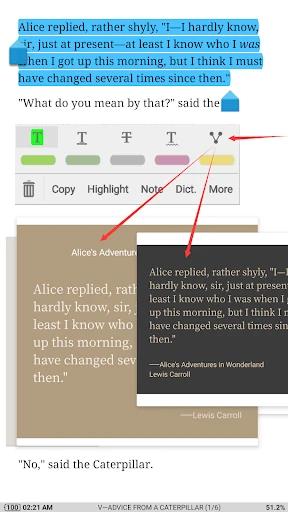
Not to forget, the app is incredibly responsive. I didn’t encounter any lags or crashes, which is a major plus. The developers have clearly put a lot of thought into making this app stable and user-friendly. It’s the little things that make a big difference, like the dictionary support for quick word look-ups and the ability to highlight text or add notes for future reference.
Final Thoughts
In a world where digital reading is becoming the norm, Moon+ Reader stands out as a top contender among eBook readers. Its rich feature set, coupled with a smooth and customizable reading experience, makes it an essential app for any book lover. It’s not just an app; it’s a companion that enriches your reading journey.
So, if you’re on the lookout for an eBook reader that offers both versatility and functionality, give Moon+ Reader a try. You might just find it becoming your go-to app for all things reading.

- Developer
- Moon+
- Version
- 9.9
- Installs
- 10,000,000+
- Android Version
- 5.0
- Content Rating
- Everyone
- Price
- Free
- Highly customizable reading experience
- Supports various file formats
- Syncs with cloud services
- Offers text-to-speech feature
- Ad-free premium version
- Free version contains ads
- Some features require premium upgrade
- Interface can be overwhelming
- Occasional syncing issues
- Limited annotation tools in free version