GIF Maker Pro
Ever found yourself in a situation where you wanted to create a quirky GIF to share with your friends or on social media? Well, let me introduce you to GIF Maker Pro, the app that’s about to become your new best friend when it comes to crafting the perfect GIFs. I’ve spent a good amount of time tinkering with it, exploring its features, and seeing how it stands up to the competition. Here’s my take on it!
Getting Started with GIF Maker Pro
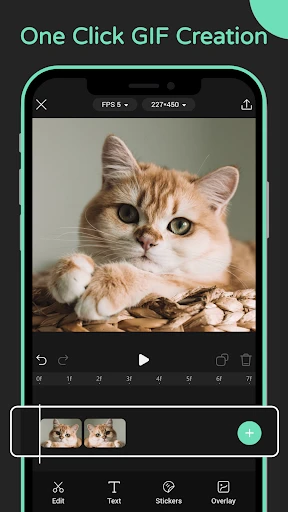
First things first, downloading and setting up GIF Maker Pro was a breeze. It's available on both Android and iOS platforms, so no one’s left out of the fun. Once you’ve got it installed, the app welcomes you with a clean, user-friendly interface. I appreciate when an app doesn’t bombard me with too many options at once, and GIF Maker Pro nails this aspect. Everything you need is neatly organized, making the whole experience feel intuitive, even for the newbies among us.
Features That Stand Out
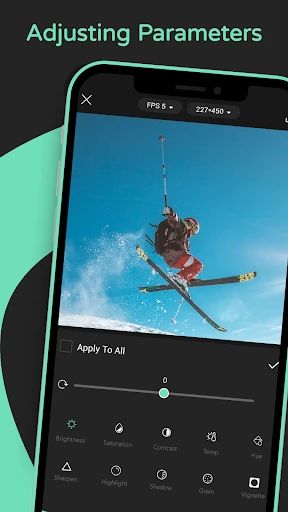
Now, onto the juicy bits - the features. GIF Maker Pro is not just about slapping a few images together. Oh no, it goes above and beyond. You can create GIFs from photos or videos, which is a big plus. The editing tools are robust yet straightforward. You’ve got your basics like trimming and cropping, but also more advanced options such as adding text, stickers, and filters. I had a bit too much fun with the sticker feature, adding silly hats and glasses to my cats, transforming them into meme-worthy creations.
Another standout feature is the app’s ability to adjust the speed of the GIFs. Want to make that epic slow-motion moment? Or maybe speed things up for comedic effect? GIF Maker Pro has you covered with just a few taps.
Sharing is Caring
Once you’ve crafted your masterpiece, sharing it with the world is effortless. The app integrates seamlessly with all major social media platforms. Whether you’re a fan of Instagram, Twitter, or even Facebook, you can share directly from the app. Plus, it boasts a decent compression rate, ensuring your GIFs maintain their quality without taking forever to upload. I found this particularly handy since I’m often on the move and need quick uploads.
User Experience and Final Thoughts
In terms of user experience, GIF Maker Pro delivers a smooth and enjoyable journey from start to finish. I didn’t encounter any bugs or crashes, which is always a relief. The app’s performance is consistent, even when working on larger files, which speaks volumes about its reliability.
In conclusion, if you’re in the market for a reliable, feature-rich app to create GIFs, GIF Maker Pro should definitely be on your radar. It’s got everything you need, whether you’re a seasoned creator or just looking to make some fun GIFs for your friends. So, go ahead, give it a download, and unleash your creativity. You won’t regret it!



- Developer
- Feel Good Foods Inc.
- Version
- 1.2.4
- Installs
- 1,000,000+
- Android Version
- 7.0
- Content Rating
- Teen
- Price
- Free
- User-friendly interface for easy GIF creation
- Wide range of editing tools available
- Supports high-resolution GIFs
- Fast processing speed
- Multiple sharing options
- Limited features in free version
- Occasional ads can be intrusive
- Some editing tools require premium
- Exporting can occasionally fail
- Limited customer support options