

Docusign - Upload & Sign Docs
Let's dive into the world of digital signatures with DocuSign, an app that's becoming the go-to for signing documents on the fly. Whether you're a busy professional or someone who just hates the hassle of printing, signing, and scanning documents, DocuSign might just be your new best friend.
First Impressions Matter
When I first opened DocuSign, I was greeted by a sleek and intuitive interface. The app is available on both Android and iOS, making it accessible to pretty much everyone. The main screen is clean and organized, allowing you to jump straight into uploading and signing documents without any fuss. It's a straightforward process, and I was signing my first document within minutes of downloading the app.
How It Works
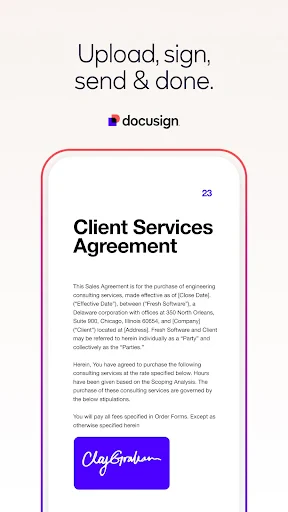
Using DocuSign is like a breeze. You start by uploading a document from your device, cloud storage, or even by taking a photo. The app supports a variety of file types, which is a huge plus. Once your document is uploaded, you can easily add your signature by drawing it, typing it in, or uploading an image of your signature. The app even allows you to save your signature for future use, which is a real time-saver.
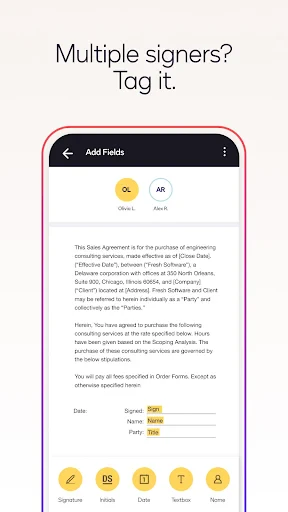
After placing your signature, you can add other necessary fields like dates or initials. The drag-and-drop feature is particularly handy, making the process quick and efficient. Once everything looks good, you simply hit send, and your signed document is on its way. It's that simple.
Features That Stand Out
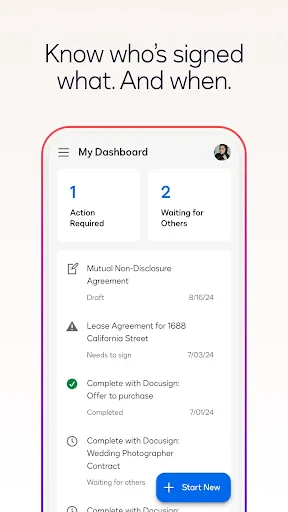
DocuSign offers some great features that make it stand out from other similar apps. The real-time status tracking lets you know exactly where your document is in the signing process. This is particularly useful if you're waiting for someone else to sign.
Another notable feature is the ability to send reminders to those who haven't signed yet. It's like having a personal assistant nagging your colleagues for you, but in the nicest way possible. Plus, the security features are top-notch. With encryption and authentication protocols in place, you can trust that your documents are safe and secure.
Room for Improvement?
No app is perfect, right? While DocuSign is incredibly handy, it does have a few areas that could use a bit of polish. For instance, the free version is somewhat limited in its capabilities. If you're a power user or running a business, you might find yourself needing to upgrade to a paid plan to unlock all the features. Also, while the app is generally user-friendly, some users might find the advanced features a bit overwhelming at first.
However, these are minor hiccups compared to the convenience and efficiency DocuSign brings to the table. The ability to sign documents anytime, anywhere, is a game-changer, especially in today's fast-paced world.
Final Thoughts
All in all, DocuSign is a fantastic app for anyone who needs to sign documents regularly. It's user-friendly, efficient, and packed with features that make the signing process as smooth as possible. While there are a few minor drawbacks, the overall experience is overwhelmingly positive.
If you're tired of dealing with the hassle of physical signatures and want to embrace the digital age, give DocuSign a try. It's a small step towards a paperless world, and who doesn't want to save a few trees along the way?

- Developer
- Docusign
- Version
- 3.51.1
- Installs
- 10,000,000+
- Android Version
- 9
- Content Rating
- Everyone
- Price
- Free
- User-friendly interface simplifies document signing.
- Secure encryption ensures data privacy.
- Integrates well with popular cloud services.
- Supports a wide range of document formats.
- Mobile app enhances flexibility and accessibility.
- Limited free version with restricted features.
- Occasional sync issues with cloud storage.
- Some advanced features can be complex.
- Premium subscription can be costly.
- Dependent on internet connectivity.


