BlueDriver OBD2 Scan Tool
When it comes to taking care of my car, I’m always on the lookout for tools that make the job easier and more efficient. That's when I stumbled across the BlueDriver OBD2 Scan Tool. And let me tell you, it’s like having a personal mechanic in your pocket!
Getting Started with BlueDriver
First off, let’s talk about setting it up. The BlueDriver is impressively simple to use. All you need is the little gadget itself and a smartphone. Just plug the BlueDriver into your car's OBD2 port (usually found under the dashboard), and connect it to your smartphone via Bluetooth. Easy peasy lemon squeezy! No wires, no fuss.
Features That Stand Out
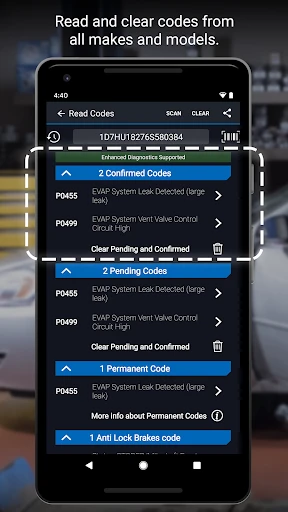
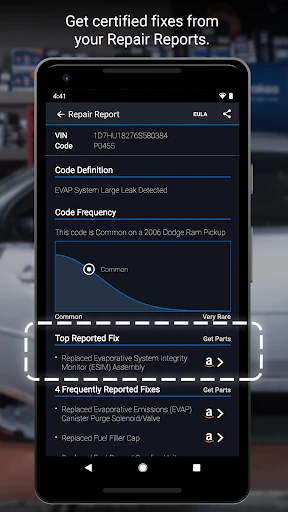
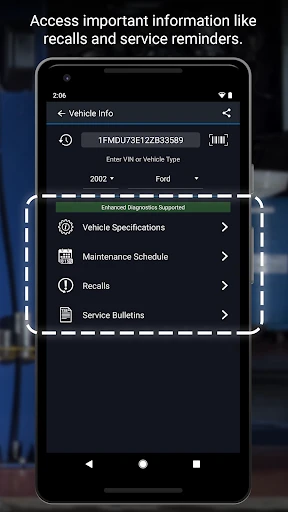
This handy tool is packed with features that make it a must-have. The BlueDriver app, available on both Android and iOS, offers an intuitive interface that even a novice can navigate without breaking a sweat. It provides a comprehensive set of diagnostics, from reading and clearing trouble codes to providing repair reports that you can actually understand.
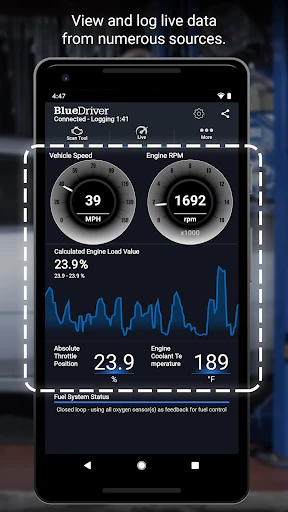
One of the coolest features I’ve found is the live data streaming. You can literally see how your car is performing in real-time. It displays everything from engine RPM to fuel system status, so you can get a detailed view of what's going on under the hood. This is super useful for those who love to tinker with their rides or just want to keep tabs on their vehicle’s health.
Why BlueDriver is a Game Changer
Now, I’ve used a few other OBD2 scanners in the past, but BlueDriver stands out for a couple of reasons. First, it’s the only scanner I’ve come across that gives you access to the same info that pro mechanics get. That’s right! You get enhanced diagnostics for specific makes like Ford, GM, Chrysler, Toyota, and more. It’s like having a tiny mechanic whispering all the car’s secrets in your ear.
Plus, the app frequently updates with new features and fixes, ensuring that you always have the latest tools at your disposal. It’s not just a purchase; it’s an investment in peace of mind.
Design and Usability
In terms of design, the BlueDriver is compact and sturdy. It doesn’t feel like a cheap piece of plastic that will break after a few uses. And because it’s so small, it’s easy to store in your glove compartment or even in your pocket.
Usability-wise, it’s a dream. The app’s interface is clean and straightforward. Whether you’re a car enthusiast or someone who just wants to save a few bucks on mechanic fees, BlueDriver makes diagnostics accessible to everyone.
Final Thoughts
After using the BlueDriver OBD2 Scan Tool, I can confidently say that it’s a game-changer for anyone who wants to take control of their car maintenance without the constant trips to the mechanic. It’s reliable, easy to use, and packed with features that provide in-depth insights into your vehicle’s health.
So, if you’re someone who loves their car and wants to keep it running smoothly, or just a tech-savvy driver who enjoys having all the latest gadgets, the BlueDriver is definitely worth checking out. It’s like having your own personal pit crew, always ready to help at a moment’s notice.
- Developer
- Lemur Vehicle Monitors
- Version
- 8.0
- Installs
- 1,000,000+
- Android Version
- 8.0
- Content Rating
- Everyone
- Price
- Free
- User-friendly interface for easy navigation.
- Comprehensive diagnostic reports.
- Wireless connectivity via Bluetooth.
- Compatible with both Android and iOS.
- Regular updates with new features.
- Limited vehicle coverage.
- Occasional connectivity issues.
- Subscription required for advanced features.
- Interface can be slow.
- Requires a stable internet connection.