AlfaOBD
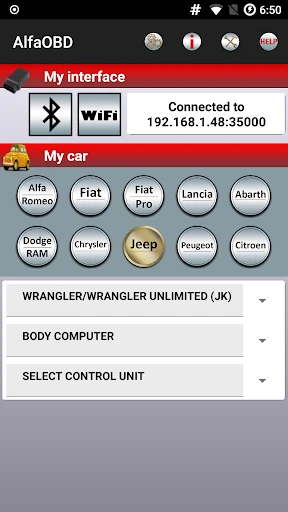
Alright, gearheads and tech enthusiasts, gather around! Let me introduce you to a gem I stumbled upon recently – AlfaOBD. If you own an Alfa Romeo, Fiat, Chrysler, Dodge, or Jeep, you might just find this app a game-changer. Whether you’re a DIY mechanic or simply someone who loves knowing every detail about your ride, AlfaOBD is here to impress.
Unleashing the Power of Your Vehicle
Have you ever wondered what's really happening under the hood of your car? Or perhaps you had an annoying warning light pop up and wished you could just zap it away? AlfaOBD is designed exactly for that. This app turns your Android or iOS device into a powerful diagnostic tool. With a simple and intuitive interface, it offers functionalities that were once reserved for professional workshops.
Features that Make a Difference
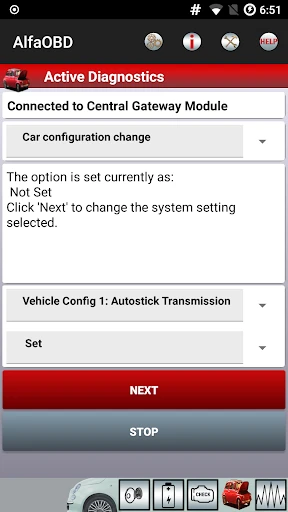
First things first, AlfaOBD isn't just about reading diagnostic trouble codes (DTCs). Oh no, it goes way beyond that. We're talking ECU programming, real-time data monitoring, and even component activation. Imagine being able to test your vehicle's actuators or reset service reminders with just a few taps on your phone. Pretty neat, right?
One of the features that stood out to me was the ability to customize your car’s settings. Whether it's tweaking the DRL (Daytime Running Lights) or setting new tire pressure thresholds, AlfaOBD gives you the reins. It’s like having a mini workshop in your pocket!
Getting Started: What You Need
Now, before you get too excited, there are a couple of things you’ll need to get started. The app itself is pretty affordable, but you’ll also need an OBD-II adapter. This is a small device that plugs into your vehicle's OBD port and communicates with your smartphone. There are plenty of options out there, but make sure to get one that's compatible with AlfaOBD.
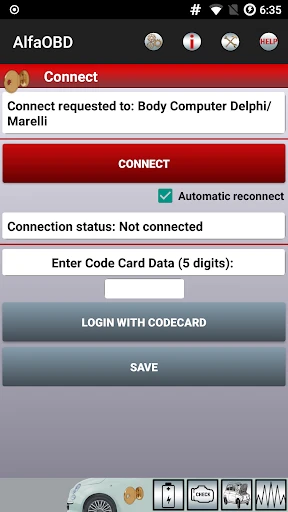
The installation process is straightforward. Download the app from the Google Play Store or the Apple App Store, plug in your OBD-II adapter, and you're good to go. The app guides you through the setup with ease, and in no time, you’ll be peeking into your car’s electronic brain.
Why AlfaOBD Stands Out
What makes AlfaOBD stand out in the crowded space of diagnostic apps is its focus on the Fiat Chrysler Automobiles group. It’s specifically tailored to work with Alfa Romeo, Fiat, Chrysler, Dodge, and Jeep models, which means it's optimized for these vehicles' unique architectures. This specialization ensures that you’re not just getting generic data but vehicle-specific insights.
Another thing I loved about AlfaOBD is its community. There's a vibrant online forum where users share tips, tricks, and support. It's like having a global network of car enthusiasts ready to help you out. Plus, the app's developers are active in the community, constantly updating the app and adding new features based on user feedback.
Final Thoughts
So, is AlfaOBD worth it? If you’re a car enthusiast or a hands-on vehicle owner, absolutely! It’s a powerful tool that bridges the gap between car owners and their vehicles, providing insights and functionalities that were once the domain of professional garages. With AlfaOBD, you're empowered to take control of your car’s diagnostics and customization. Just remember, with great power comes great responsibility—use it wisely!
In a nutshell, AlfaOBD is like having a Swiss Army knife for your car's electronics. It's flexible, powerful, and incredibly handy. So, if you're ready to dive deep into your vehicle's operations, give AlfaOBD a spin. You might just find it's exactly what you’ve been looking for.


- Developer
- AlfaOBD Autodiag
- Version
- 2.4.1.0
- Installs
- 50,000+
- Android Version
- 4.0.3
- Content Rating
- Everyone
- Price
- $49.00
- Comprehensive diagnostic tool for vehicle systems
- Supports a wide range of car makes and models
- User-friendly interface with clear instructions
- Regular updates with new features and fixes
- Offline functionality for remote diagnostics
- Requires a compatible OBD device to function
- Might be overwhelming for novice users
- Limited customer support options
- Some features require in-app purchases
- Interface may seem outdated to some users